Facebook Photos Redesign, A Beautiful View of Photos


Facebook has once again redesigned the look of its Photos service. This time, the company is attempting to beautify the look of Photos on your and others Timeline.


The new landing page is just an update of the old one: it has all of a Facebook user's photos on one page, which Facebook friends can easily Like and comment on.

Now when you click Photos at the top of your timeline, you’ll see larger pictures that fill up the page. You can use the menu to find shots you’re tagged in, pictures you’ve shared and albums you’ve created.


Given that this feature is part of Timeline, it of course offers you a way to highlight photos for featuring on your Timeline. To do so, click the star button beside a given photo.

Facebook with keyboard shortcuts


Facebook has a small, but useful set of keyboard shortcuts you can use to navigate the social networking site.


The shortcuts work best with Chrome in Windows and Firefox on Mac OS X, because they only need one modifier key, plus the shortcut key. Also keep in mind that the number shortcuts must be pressed from the number row; they don't work with the number pad.


Here are the keyboard shortcuts for Facebook:


Windows
Firefox modifier: Shift + Alt + #
Chrome modifier: Alt + #


Mac
Firefox modifier: Control + #
Chrome modifier: Control + Option + #
Safari modifier: Control + Option + #


Shortcuts
1 : home
2 : timeline/profile
3 : friends
4 : messages
5 : notifications
6 : general account settings
7 : privacy settings
8 : Facebook's Facebook page
9 : legal terms
0 : help center
m : new message
? : search


That's it. If you're wondering why Internet Explorer 9 was left out, it's because only the home and timeline shortcuts seem to work. If you want to use IE9 anyway, the modifier is Alt + #, then Enter.

Top 10 Games of Facebook in 2011

Facebook, the biggest platform for social games, released its list of the most popular games of 2011.


Unlike most year-end lists, this one actually has quite a few surprises. I fully expected CityVille, Zynga’s hit social game, to top the list. Nope. According to Facebook’s measurements, that honor belongs to Gardens of Time.


In the update announcing the list, Facebook does say it is basing its ranking on “games that drew the most active users and received the highest user recommendations.”


Facebook most popular games in 2011

  1. Gardens of Time (By Playdom)
  2. The Sims Social (By EA)
  3. Cityville (By Zynga)
  4. DoubleDown Casino (by DoubleDown Interactive)
  5. Indiana Jones Adventure World (By Zynga)
  6. Words With Friends (By Zynga)
  7. Bingo Blitz (By Buffalo Studios) 
  8. Empires & Allies (By Zynga)
  9. Slotomania-Slot Machines (By Playtika) 
  10. Diamond Dash (By wooga)

Facebook private messages between pages and fans


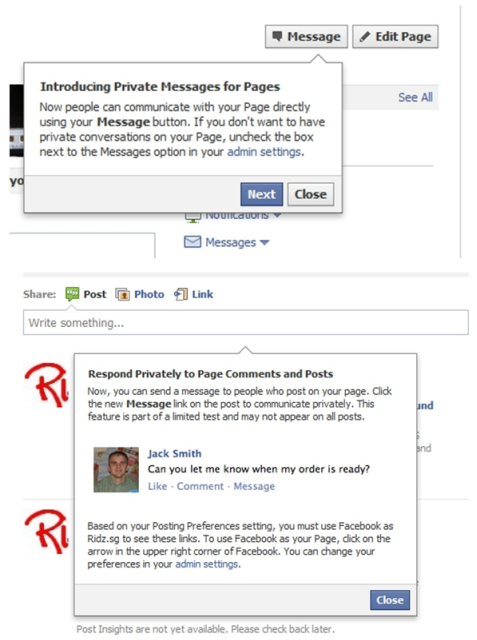
Facebook has begun introducing a new feature which allows business pages to receive private messages from their fans on the social network.

The new communications option, which has appeared for Asia-based admins only so far — although this could be down to time difference — is a significant introduction that will allow businesses to interact more closely with customers on the service than ever before.


Consumer facing businesses will find the feature particularly useful as it enables more personal communication with individual customers, opening the possible of a greater level of customer service on Facebook. The move is also likely to cut down on the pain of off-topic comments on company pages and reduce communication lost when Facebook fans fail to take their comments to customer service channels outside of the social network.
facebookprivatemessage 1 Facebook introduces private messages between business pages and fans

Zuckerberg answers the big question “Is Google+ a threat?”

Does Mark Zuckerberg really see Google+ as a threat?

The question was met with a wry smile that almost dismissed the question before he’d answered it but thankfully he continued:
“Yeah Google’s a great company and I think we want to look at and learn from everything that they do. But at the same time, people have shared a lot on Facebook and have already told a lot of their life story on Facebook. And we think that we have by far better tools for doing that.”


Get New Google Bar right now - Hack


How to get Get New Google Bar right now?


1. Go get this extension to change cookies. http://goo.gl/CeKtT
2. Load Google.com and right-click to edit the cookies.
3. Change “PREF” to this (try triple-clicking it):
ID=03fd476a699d6487:U=88e8716486ff1e5d:FF=0:LD=en:CR=2:TM=1322688084:LM=1322688085:S=McEsyvcXKMiVfGds
4. Don’t forget to save your changes at the bottom.
5. Reload and you have the new Google bar.


1. Get this Extension, then click Add to Chrome
Get the "Edit This Cookie" extension: http://goo.gl/CeKtT

2. Click Install

3. Go to Google.com while you're logged into your Google account
Right-click, then select Edit Cookies

4. Click PREF, then select the "value" box by double clicking, background will turn blue.

5. Copy and paste this code into that box:
ID=03fd476a699d6487:U=88e8716486ff1e5d:FF=0:LD=en:CR=2:TM=1322688084:LM=1322688085:S=McEsyvcXKMiVfGds

6. At the bottom of the page, click "Submit Cookie Change."

7. Restart your browser, then roll over the Google logo and take a look at the new Google user interface!
(VIA:Mashable)

Here’s How People Look at Your Social Media Profiles


The study used the webcams of 30 participants to record their eye movements as they were shown profile pages from Facebook, Google+, LinkedIn, Flickr, YouTube, Klout, Reddit, Digg, Tumblr, Twitter, StumbleUpon and Pinterest at 10-second intervals. What participants looked at on each page and in what order is recorded in the images below.

It’s not a perfect study. Thirty is a small sample size, and what draws attention on a profile likely varies depending on the content displayed. But we’ve hazarded making a few observations:
  • Profile pictures matter. The site feature that attracted most attention on Klout, Facebook and StumbleUpon was the profile photo.
  • Job title garnered more attention than profile photo on LinkedIn. In fact, it got more attention than anything else on the page.
  • Who you know gets noticed. Even if for no better reason than their placement on the page, people do look at those little thumbnails of friends that appear on many social profiles. You can see this in the data from the Facebook, Google+, Twitter and Klout profiles.
  • Content on top wins. The further something is down a page, the fewer number of people look at it. This was true on both content-focused profiles such as Pinterest and Digg as well as socially focused profiles such as Facebook. On the Twitter and YouTube profiles, the effect was less extreme.
Take a gander at the results of the study in the gallery below, and let us know your own observations in the comments.
Click to enlarge image
Facebook


Google+


Linkedln


Flickr


YouTube


A new Google bar

Six months ago we started rolling out a new look and feel for Search, News, Maps, Translate, Gmail and a bunch of other products. Our goal was to create a beautifully simple and intuitive user experience across Google. 

We’re now ready for the next stage of our redesign—a new Google bar that will enable you to navigate quickly between our services, as well as share the right stuff with the right people easily on Google+. 


Instead of the horizontal black bar at the top of the page, you’ll now find links to your services in a new drop-down Google menu nested under the Google logo. We’ll show you a list of links and you can access additional services by hovering over the “More” link at the bottom of the list. Click on what you want, and you’re off.

To find out more about the new Google bar, take a look at this video or read google Help Center article.


Making navigation and sharing super simple for people is a key part of our efforts to transform the overall Google experience, which is why we’re very excited about this redesign. Enjoy!


Source:googleblog

Google’s Chrome Browser Will Soon be Controlled by Gamepads


A lot of you read Giz using Google Chrome — which means a good percentage of you should be interested in the news that Chrome will soon have plug-and-play gamepad support added. It'll work on any computer (or Chromebook) running the Chrome browser, and according to Google, will be a seamless experience.


That means in theory you should be able to plug in a joystick or gamepad and start controlling the browser straight away, without having to install software. Alongside gamepads, webcams and microphones will have similar plug-and-play support, which will open up the door for some nice HTML5 web apps fun.

Barack Obama Joins Google+

Debate is still raging about how many people are really using Google+ and whether it can ever overtake Facebook. But at least one prominent user was making active use of the site Wednesday: President Barack Obama.

Obama’s profile, which just gained a “verified account” tick mark, appears to have been launched first thing Wednesday morning. Naturally, it isn’t being run by the President himself, but by his reelection campaign — a fact that the profile’s posts makes no attempt to hide.

“Welcome to the Obama 2012 Google+ page,” reads the first Presidential post. “We’re still kicking the tires and figuring this out, so let us know what you’d like to see here and your ideas for how we can use this space to help you stay connected to the campaign.”

Since that first announcement, Obama’s campaign has posted twice more Wednesday — once to tout the President’s tax credits for unemployed veterans, and once to push a campaign contest where winners get to have dinner with Obama. It has posted nine scrapbook photos, and no videos.

We’re looking forward to the President’s first Google+ hangout,

Facebook is working on a smartphone with HTC


OK, so Facebook is reportedly working on a smartphone with HTC. My initial reaction: who cares?
The latest rumor that such a smartphone may be on the drawing boards comes from All Things Digital. The process is in the early stages, and it's unclear whether the phone would ever advance past that stage. If Facebook is smart, it'll put this project down as quickly as possible.
A Facebook phone may sound like a great idea, but consumers are accustomed to devices that can handle multiple tasks, access any service, and tap into all social networks--which may not fall in line with the company's agenda. The core dilemma for such a phone is that few people actually use Facebook enough to justify buying a device solely focused on one social network.
I'll admit that I'm an avid Facebook user. I spend a nice chunk of the day on Facebook in the office (maybe too much, if you ask my boss). I don't even spend a lot of time on social games, which I know suck up a massive amount of time.
But when I'm on the go, I barely look at Facebook. I'll occasionally pop open the app, if there's an interesting update from a friend, update my own status, or upload a funny photo. I assume that there are a lot of people like me: Facebook campers at work or at home, but casual users when it comes to their mobile devices. Those aren't the kind of people who would buy a Facebook-centric device.
Remember, there's a quasi-Facebook phone already on the market. It's called the HTC Status. The phone was a complete bust, despite AT&T's efforts to push the first phone with an integrated Facebook key. While the advertising campaign could have been better--it highlighted objects in a disturbing glowing-blue color to emulate the glowing Facebook button at the bottom of the device--AT&T did, at least, promote the phone. After launching in July, the phone is now given away with a two-year contract.
Granted, the Status was a budget-friendly phone, at $49.99, geared toward a younger social-networking generation, and it represented only modest contributions from Facebook. By contrast, Facebook is expected to weigh in heavily on the new phone--which may not necessarily be a good thing.
If the reports from AllThingsD are correct, Facebook may follow Amazon.com's path in creating its own highly customized version of Android to power the phone. The problem with such a strategy is, you lose access to the kind of core services Google powers, including Android Market and Gmail. That may be moot to Facebook, which would want to run its own messaging and e-mail services on the device, anyway. Otherwise, why go through the trouble?
Again, I'm not sure many people would want the whole Facebook--and only Facebook--experience on their phone. For instance, I rely on Gmail for my e-mail, and AIM and Yahoo Messenger for instant messages.
I doubt that many people used Facebook's failed attempt to create an e-mail service. And while the idea of integrating my Facebook social network into my address book sounds great, it doesn't work in practice. I've used tools provided by the likes of HTC or Samsung Electronics to do so in my Android smartphones, and the result is a labyrinthine list of people with whom I maintain little to no contact.
The smartphone business, despite its growth potential, is incredibly hard to break into. A company looking to jump in needs to work with the carriers, if it wants any sales support or subsidies. It also needs to strike deals with retail outlets, and it needs to be prepared to spend a hefty amount itself on marketing and promotion. Google attempted to circumvent the system and sell its Nexus One directly to consumers, and it was overwhelmed by customer service issues, despite poor sales of the device.
The only real exception has been Apple, which already had a strong brand, and an expertise in hardware and software in consumer electronics devices. It seemingly came out of nowhere with the iPhone, and it revolutionized the smartphone market.
Facebook certainly has the brand, but it's unclear whether it has the chops to handle the other parts of the phone business. HTC, with its long history of solid smartphones and relationships with carriers, retailers, and other wireless players, will be able to help greatly.
One way would be on pricing. Facebook doesn't charge its users for access to the site. If it does, in fact, offer a phone optimized for its site, it should stick with that strategy and offer the smartphones free with a two-year contract. The device itself also shouldn't feel like a budget phone like the Status; it would need to be packed with high-quality parts.
As with Amazon's Kindle strategy, the real money would be made after the customer buys the phone. While Amazon wants to sell more products (such as e-books), Facebook could lean on its roots and make up any loss on the phone with targeted mobile advertising.
But even then, it would come out of the gate with a severe disadvantage. If the development process is just getting under way, a product won't show up for another 12 to 18 months, giving ample time for Google, Apple, and Microsoft to leap ahead with the next round of innovation on mobile devices. Can Facebook compete in that sea of smartphones? I don't think so.
Now excuse me while I post another status update...on my laptop.
source:CNET

How to get the new YouTube layout right now


The new YouTube design is slowly rolling out to users, but if you aren't the waiting kind, there is a way to enable it right now.
You will need to visit YouTube.com and add a line of code to the console. Don't worry, it sounds worse than it really is.
Once you have loaded the site, press the following key combo for your respective browser.
Firefox:
Ctrl/Cmd+Shift+K
Chrome:
Ctrl+Shift+J (Windows)
Cmd+Alt+J (Mac)
Click to enlarge
(Credit: Screenshot by Jason Cipriani)
Once the console is open, type (or copy) the following line of code:
document.cookie="VISITOR_INFO1_LIVE=ST1Ti53r4fU";
Close the console, refresh the Web page, and like magic, you should now have the new YouTube design.
Users are reporting mixed results with adding the same line of code in Safari. We were unable to get it to work. If you are able to get it to work in Safari, feel free to share how you did it in the comments below.
What are your thoughts on the redesign? Love it, hate it, or don't really care? Let us know!