Facebook has a small, but useful set of keyboard shortcuts you can use to navigate the social networking site.
The shortcuts work best with Chrome in Windows and Firefox on Mac OS X, because they only need one modifier key, plus the shortcut key. Also keep in mind that the number shortcuts must be pressed from the number row; they don't work with the number pad.
Here are the keyboard shortcuts for Facebook:
Windows Firefox modifier: Shift + Alt + # Chrome modifier: Alt + #
Mac Firefox modifier: Control + # Chrome modifier: Control + Option + # Safari modifier: Control + Option + #
Shortcuts 1 : home 2 : timeline/profile 3 : friends 4 : messages 5 : notifications 6 : general account settings 7 : privacy settings 8 : Facebook's Facebook page 9 : legal terms 0 : help center m : new message ? : search
That's it. If you're wondering why Internet Explorer 9 was left out, it's because only the home and timeline shortcuts seem to work. If you want to use IE9 anyway, the modifier is Alt + #, then Enter.
India has been given the dubious honour of being named the top source of spam in the world in a report from Internet security firm Kaspersky.
A recent report by Kaspersky Lab, a Moscow-based global Internet security firm, says more spam was sent from the south Asian giant than anywhere else in the world in the third quarter of the year.
An average of 79.8% of global email traffic was spam. Of that, 14.8% originated in India, with Indonesia and Brazil taking the second and third spots with 10.6% and 9.7% respectively.
As AFP reports, it appears that crackdowns on sending junk email in other countries have sent spammers to India, where laws on the practice are said to be lax. The size of the Indian Internet userbase is possibly a factor too – behind China and the USA it has the third largest number of Internet users in the world.
Kaspersky told AFP that lack of awareness of technical issues in India means that it’s easy for cyber-criminals to build ‘botnets’ of computers to carry out spam attacks without their users being aware.
The ball’s now in the Indian government’s court to provide laws that cure the country’s apparent spam epidemic.
Hollywood is really banking on Christmas being a big weekend.
Mission: Impossible - Ghost Protocol with Tom Cruise already had a big Wednesday, grossing $8.5 million on the first day of the long Christmas weekend at the box office. Cruise’s fourth M:I film is expected to top the box office, giving Hollywood a much-needed Christmas present after three straight weeks of weak numbers. The Girl with the Dragon Tattoo is also expected to do well.
Ghost Protocol, The Incredibles director Brad Bird’s first live-action film, is expected to make a total of $45 million between Wednesday and Sunday, reports The Los Angeles Times. The film has actually been in theaters since last Thursday, debuting in over IMAX 400 theaters, so this is its first weekend in wide release. It has already made $25.7 million. Entertainment Weekly predicts that the film will make $27 million between Friday and Sunday.
David Fincher’s The Girl With The Dragon Tattoo with Daniel Craig also had a strong Wednesday, which is expected to propel it to second place over the Christmas break. The R-rated film could make at least $30 million through the weekend, with $17 million of that coming over the weekend itself, predicts EW.
Sherlock Holmes: A Game of Shadows should be able to make it to third place after a weak opening last weekend. The film could make at least $27 million, putting it just behind The Girl with the Dragon Tattoo. It could make around $15 million during the three-day weekend, but it is still far behind the first film in Guy Ritchie’s Holmesfranchise.
Alvin and the Chipmunks: Chip-wrecked, which made $3.9 million Thursday, according to Deadline, could wind up with $24 million by the end of the weekend. Between Friday and Sunday, it is expected to make around $12 million according to EW.
Bringing up the rear at the top of the box office will be Steven Spielberg’s The Adventures of Tintin, which made $2.3 million on Wednesday and $2.4 million on Thursday. It could end up making around $16 million by the end of the weekend and just under $10 million between Friday and Sunday. That probably won’t matter too much to Spielberg, since the film has already made well over $200 million internationally.
The study used the webcams of 30 participants to record their eye movements as they were shown profile pages from Facebook, Google+, LinkedIn, Flickr, YouTube, Klout, Reddit, Digg, Tumblr, Twitter, StumbleUpon and Pinterest at 10-second intervals. What participants looked at on each page and in what order is recorded in the images below.
It’s not a perfect study. Thirty is a small sample size, and what draws attention on a profile likely varies depending on the content displayed. But we’ve hazarded making a few observations:
Profile pictures matter. The site feature that attracted most attention on Klout, Facebook and StumbleUpon was the profile photo.
Job title garnered more attention than profile photo on LinkedIn. In fact, it got more attention than anything else on the page.
Who you know gets noticed. Even if for no better reason than their placement on the page, people do look at those little thumbnails of friends that appear on many social profiles. You can see this in the data from the Facebook, Google+, Twitter and Klout profiles.
Content on top wins. The further something is down a page, the fewer number of people look at it. This was true on both content-focused profiles such as Pinterest and Digg as well as socially focused profiles such as Facebook. On the Twitter and YouTube profiles, the effect was less extreme.
Take a gander at the results of the study in the gallery below, and let us know your own observations in the comments.
Looking over all the portable computing trends of the past few years--thinner systems, solid-state-drive hard drives, 16:9 displays--one overall theme is that high-quality laptops are less expensive than ever.
Some years ago, $1,000 was considered reasonable for a budget-minded laptop, while today, that same Grover Cleveland means you're shopping for a high-end laptop (and in that case, usually a MacBook).
That means that in the run-up to the holiday shopping season--see more about that in our annual Holiday Gift Guide)--there are plenty of excellent laptop options for every budget, from $400 ultraportables to $1,700 multimedia powerhouses. We've collected a handful of suggestions in the budget, mainstream, and high-end categories, concentrating on recent laptops that should be easy to find online or on store shelves.
All of the laptops highlighted below are solid choices, and in particular Dan likes the HP Pavilion dm1z, a budget ultraportable that at $450 is almost a stocking stuffer. Scott is partial to the budget end of the spectrum as well, calling the Dell Inspiron 14z one of the best current all-around laptop values, with good battery life and a thin (for a midsize system) design.
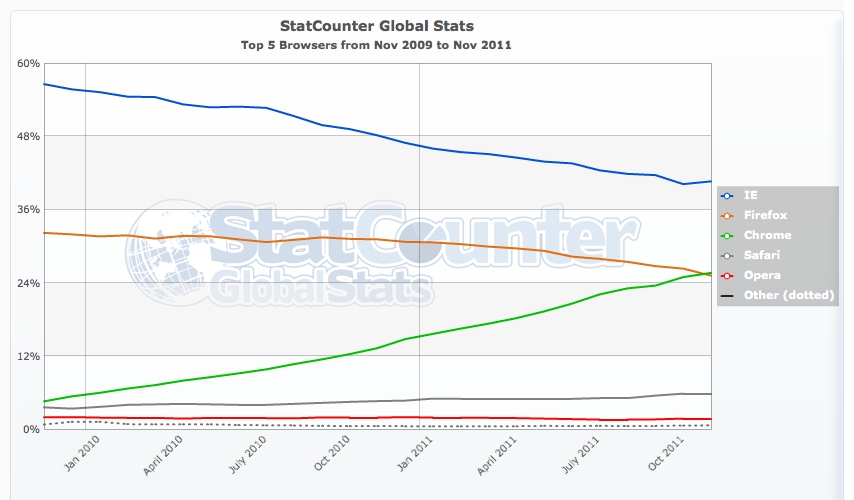
If one in 50 people on the Web move from Firefox to Chrome, Google's browser will unseat Mozilla's for the No. 2 spot in worldwide usage.
That's because, according to Net Applications' November browser usage measurements, Chrome is now within 4 percentage points of Firefox. With a 2 percentage-point increase in one and a 2 percentage-point decrease in the other, Google comes out on top.
Firefox dropped 0.4 percentage point to 22.1 percent of usage in November, while Chrome gained 0.7 percent to 18.2 percent. If that rate was to continue, Chrome would outpace Firefox in March 2012, but fluctuations make such predictions difficult.
Firefox once was the prime challenger to Microsoft's Internet Explorer, which for years languished in the doldrums of software development. Now it shares that role with Chrome and, to a lesser degree, Apple's Safari. Microsoft is in high gear again, though, with IE9 a credible challenger and IE10 shaping up to be a strong competitor when it's finished in 2012.
The browser market is now fiercely competitive as browser makers use the software to drive their agendas. For Microsoft, it's about the Metro user interface in Windows 8; for Google, it's browsing speed and Web applications; for Mozilla, it's a Web built on openness and standards; and for Apple, the best mobile devices.
In the mobile market, Apple's Safari dominates, while Opera Mini and the Android browser jockey for second place.
In November, IE's steady decline stopped, with Microsoft's browser holding steady at 56.2 percent of usage. Microsoft has largely written off Windows XP users by requiring Windows Vista or Windows 7 for its current IE9. The company measures its performance by Windows 7 usage. there, IE9 passed Chrome and Firefox in usage and now trails only IE8.
The vast majority of browser usage today is from personal computers--92.2 percent. But with smartphones and tablets, mobile-device usage is generally increasing. In November, it reached a record 6.7 percent, according to Net Applications.
The top mobile browser by far is Apple's Safari, but it plunged 7 percentage points to 55.0 percent of usage in November. The Android browser had bumped Opera Mini aside in October for the second-place spot, but in November, Opera Mini clawed its way back. Opera's lightweight browser, which runs on thousands of phones, surged 7 percentage points to 20.1 percent, while the Android browser dropped 2.2 percentage points to 16.4 percent.
Opera also offers a full-fledged browser, Opera Mobile, for higher-end smartphones. But that remains relatively rare at 0.4 percent of mobile browser usage.
We are very proud to officially announce that Grand Theft Auto V is in full development.
Developed by series creator Rockstar North, Grand Theft Auto V heads to the city of Los Santos and surrounding hills, countryside and beaches in the largest and most ambitious game Rockstar has yet created.
A bold new direction in open-world freedom, storytelling, mission-based gameplay and online multiplayer, Grand Theft Auto V focuses on the pursuit of the almighty dollar in a re-imagined, present day Southern California.
Nokia's Lumia 800 is a big deal. Why? Because it's the first mobile phone from Nokia to run Microsoft's Windows Phone operating system, the OS that Nokia is going to use on all its future high-end smart phones.
The handset boasts a fast processor, AMOLED screen and a camera with a Carl Zeiss lens. But is it good enough to revive Nokia as a serious player in a world of smart phones dominated by Apple, Samsung and HTC? Available now, it's around £470 SIM-free, £400 on pay as you go or free on contracts from around £25 per month.
Should I buy the Nokia Lumia 800?
The Lumia 800 is a stylish looking handset and its build quality is also first-rate. It's a fun phone to use, thanks to Microsoft's slick Windows Phone 7.5 software, which has excellent integration for social networking sites, such as Facebook and Twitter.
The Nokia Mix Radio streaming service may not be revolutionary, but the fact it's free and has a good selection of tunes and playlists makes it a welcome addition. We also like Nokia's Drive navigation software, especially as you can download maps to avoid incurring roaming charges when using it abroad.
The range of apps available for Windows Phone is growing steadily. Even so, you stilll won't find anywhere near as many in the Windows Phone Marketplace as you will in Apple's App Store or Android Market.
The phone's battery life is on a par with most other smart phones so you can expect to have to charge it at the end of each day. Call quality is excellent and it's good at maintaining a connection in weaker signal areas.
If you're not overly concerned with having a particularly high-resolution screen, and are willing to put up with a camera that's not quite as good as other similarly-priced smart phones, then the Lumia is a good option. This is especially true if you're looking for an alternative to the iPhone that still offers a very polished user experience.
Operating system
The big difference between the Lumia 800 and previous Nokia smart phones is that this handset runs on Microsoft Windows Phone software. Naturally, it uses the latest Mango version of the operating system, which includes a number of new features, not least of which is support for multi-tasking.
Microsoft's previous mobile OS, Windows Mobile, was a mess. Thankfully the company went back to the drawing board and came up with a brand new interface. The results are very impressive. Once you've used it, it's not difficult to see why Nokia's head honcho decided to dump Symbian in favour of it.
Windows Phone looks absolutely gorgeous. Thanks to some slick 3D effects and its dynamic design, it feels more modern than even Android or iOS.
The main homescreen displays a column of live tiles that dynamically update to shows you various information. For example, the People Hub flicks through photos drawn from your social networking contacts, while the messaging and mail titles show you any unread messages you might have.
You can also pin applications, pictures, contacts and other bits and bobs to this homescreen to use as shortcuts. Swiping right reveals your full list of apps as a single scrollable list.
You can tap the search button to quickly find a particular app, or if you've got more than 44 entries in the list, Windows Phone automatically divides up your apps alphabetically so you can quickly jump to groups of apps.
The homescreen displays a series of live titles.
When you open an application, the titles tear away from the screen with a cool 3D flip-effect and the same happens when you leave an app to return to the home screen.
If you've got multiple apps running you can switch between them by holding down the back button. This calls up a deck of cards showing a thumbnail of all the apps currently loaded. You can then scroll over to quickly select the one you want to jump.
You can swap between open apps by holding down the back button.
One of the best things about the OS is that social networking is built into the operating system. The People Hub pulls together not just all your contacts, but also feeds from Facebook, Twitter and Linked-in. What's more, conversations in the messaging app can jump between text messaging and social media messaging and Windows Phone will keep them all threaded in the same conversation.
The People Hub groups together all your social networking feeds.
However, the OS does have drawbacks. The Bing Maps that are integrated into the OS are pretty poor, not because they're inaccurate -- they're not -- but simply because they don't show as many street names on the standard zoom level as you get with Google Maps on Android or the iPhone.
When you can't see the name of the street where you need to turn off, it's a huge annoyance. Unfortunately it happens all the time with Bing Maps. Also the cut and paste system can be fiddly to use as the tabs for selecting text are on the small side. Another issue is that the OS doesn't yet support Adobe Flash, so you can't view videos on websites like BBC iPlayer.
We're not big fans of the Bing Maps as they don't display enough street names at the standard zoom level.
Design
The Lumia's design will bring on a sense of déjà vu for anyone who has previously seen Nokia's N9 handset. The body is hewn almost entirely from polycarbonate and is available in three colours: black, cyan and magenta. The two long edges are curved like the old iPod Nano and the back is gently sloped at the top and bottom.
The result is that the phone looks slightly oblong when viewed side-on. Despite the use of plastic for the body, it has a very premium and sturdy feel. Besides, Nokia says that the plastic casing helps the handset's phone reception.
The body of the phone is slightly oblong in shape.
The front is almost completely taken up with the gorilla glass that covers the screen and three Windows Phone touch buttons at the bottom. This helps to give the face a smooth, seamless look. The only physical buttons are mounted on the right-hand edge.
Here you'll find a volume rocker switch, the lock button and a dedicated camera button. One thing we love about Windows Phone handsets is that they all have dedicated camera buttons; you jump directly to the camera app, even when the phone is in standby, just by pressing and holding it down.
Nokia has placed the standard 3.5mm headphone jack at the top corner; hidden behind a flap next to it is a micro USB port that's used for both charging and syncing. Further along the top edge there's a sliding cover that -- when released -- gives you access to the SIM card slot. Like the iPhone, the Lumia uses a micro SIM, so if you have a full-sized SIM that you want to use with the phone you'll have to get it cut down to size.
The Nokia Lumia 800 uses a micro SIM.
The phone fits nicely in the hand and the curved edges arguably make it more comfortable to hold than the more angular iPhone 4S. Its smaller display also means that it's narrower and shorter than Samsung's S2. As a result, it feels more pocketable.
On the downside, like the iPhone 4S, the Lumia 800 is a completely closed device. You can't remove the battery and you can't add any more memory to it, as there's no microSD card slot.
Processor, memory and speed
Nokia has built the phone around a 1.4GHz Qualcomm MSM8255 Snapdragon processor, which includes an Adreno 205 GPU. The OS has 512MB of RAM and 512MB of ROM to play with. There's 16GB of memory for storing music, videos, photos and apps.
Those specs may seem tame next to the dual-core processors used in the iPhone 4S and Samsung Galaxy S2, but the Lumia still feels like a very quick handset. This may in some part be due to the lower demands that Microsoft's OS seems to place on a phone's hardware. Windows Phone uses hardware acceleration for its 3D menu effects, scrolling and zooming, which seems to help keep everything rollicking along at a very sprightly pace. Apps open quickly and it's speedy when jumping between them. Pages are also quickly rendered in the browser.
The browser is speedy when it comes to rendering pages.
The Lumia also easily outdid HTC' s Radar in the Benchmark Free application. It scored 6.3 in the CPU integrate test versus the Radar's 4.7 (a higher number is better). This is perhaps not surprising given that the Radar uses a slower 1GHz chip. However, in the Javascript SunSpider Test it scored a disappointing 6,915.7ms, compared to the iPhone 4S's score of just 2,181.6ms and the Samsung Galaxy S2's 3,445.3ms (lower is better).
Battery life and call quality
Call quality was, on the whole, very good. The ear piece delivers clean and crisp audio and is also loud enough to let you hear callers above the din of noisy bars or busy streets. The mic delivers impressive quality speech. The phone's reception is excellent -- it does a good job of holding on to a connection even in weaker signal areas.
In the past, Nokia phones have enjoyed a strong reputation for providing long battery life. Unfortunately that hasn't transferred across to the Lumia 800. You'll get around a day out of it before it needs a recharge, which is really no better or worse than the majority of smart phones.
Screen
The Lumia has a 3.7-inch screen which, like all of the current Windows Phone handsets on the market, has a resolution of 480x800 pixels. That's some way off the resolution of the iPhone's 4S screen. The display uses AMOLED technology similar to that used on the Galaxy S2.
There are a few benefits to AMOLED displays: they're self-illuminating so darker colours draw less power than LCD screens; they're also capable of producing very, very dark black levels. In fact, the screen produces such dark blacks that it can be difficult to see where the display ends and the bezel begins when you're on the WP7 homescreen.
The Lumia's screen's brightness levels are very high, which gives colours a really vibrant look. However, the display isn't without its problems. Like a lot of OLED screens, whites have a slightly blue-ish tinge; this is often noticeable on webpages with white backgrounds such as Google's homepage. The Lumia wasn't as blue-ish as the display on our Galaxy S2, but next to the iPhone 4S, or even just a white sheet of paper, it was still noticeably off.
The screen's very bright indeed.
Colours can appear overly peaky or a tad too vivid, but again this is an issue that also affects the Galaxy S2's AMOLED display. Some people might like the effect even though it's not as colour-accurate as other displays.
This model suffers a little from the same type of PenTile matrix problem that affected the original Samsung Galaxy S. Due to the way the screen creates coloured pixels by grouping red, blue and green subpixels together, text that is rendered very small can look speckled or blurry. It's not a massive issue but it is noticeable at certain times such as when you're looking at grey text against a white background in the browser.
Nokia apps
When it announced its tie-up with Microsoft, Nokia made a big deal of the fact that it would be the only manufacturer that would be truly allowed to customise the OS. As such, we were interested to see what was different about the Lumia 800 compared to other Windows Phone handsets.
The answer is not all that much, at least at present. Nokia representatives were keen to point out that there's more to come in the future. Unfortunately, the Nokia Maps software was not available on our handset, although Nokia promises that it will be there once the phone is officially released in the UK.
What you do get is Nokia Drive, which offers turn-by-turn navigation, complete with voice prompts. Maps are actually downloaded to the phone and stored locally; you won't rack up roaming charges if you use it abroad as long as you've downloaded the maps beforehand. You can also download voice packs and languages if you need, and the view can be switched between 2D and 3D modes, complete with landmarks.
The Nokia Drive Software offers turn-by-turn navigation.
The other big addition is the Nokia music app. This duplicates some of the functionality of the standard Zune music app built-in to Windows Phone, in that you can use it to playback tracks that you've transfer from a PC using the Zune desktop software. It also has an on-phone music store where you can purchase and download tracks (at a cost of 99p each).
It does add a couple of extra features: the Gigs option shows you what gigs are on near you and lists the time at which they start and the venue address. Of more interest is the Mix Radio option. This lets you stream hours of music for free -- there's no subscription required and you don't even have to sign up or provide any log-in details.
The Gigs tab shows you what concerts are coming up in your area.
You simply select a genre and you're then presented with playlists that you can listen to. For example, if you pick Rock, you'll find playlists for new rock releases, bestsellers, punk rock and 1990s alternative, among a whole load of others.
Once you select one, music will start streaming to your phone within seconds. It acts a lot like the radio features in Napster, except that you can only skip forward a track and you can only skip seven tracks within a 24-hour period. If you like a track there's a link to buy it from the music store.
Mix Radio lets you stream playlists to your phone for free.
The service works over 3G as well as Wi-Fi. Our test phone only supported live streaming, but Nokia says it will soon update the app to add a feature to let you cache tracks for listening offline and let you pin a playlist to your start screen. Even without these features, we really liked using Mix Radio; its selection of tracks seemed pretty comprehensive and the range of genres covered is broad.
The only other app that Nokia has added is App Highlights, which simply offers some recommendations on apps you might want to download from the Marketplace. It also alerts you when updates are available for Nokia's own apps.
App Highlights shows you new apps that might be worth downloading.
Windows Phone Marketplace
When it comes to other apps, Windows Phone is found lacking compared to the competition. Whereas Apple's App Store and Android Market offer tens, if not hundreds, of apps for every conceivable task, the Windows Phone Marketplace is a relatively barren place.
For some people this may not be an issue. The OS does, after all, have built-in support for Facebook, Twitter and LinkedIn. It also comes with the excellent mobile version of Microsoft Office for creating and editing office documents.
The Windows Phone Marketplace is growing, but still poorly stocked compared to Apple's App Store and Android Market.
On the plus side, since the launch of Mango, there's been a notable increase in app releases. Newsreaders like Pulse and Weave have made their way onto the platform, as well as the likes of Tesco Groceries, Groupon, Amazon Kindle, Kayak and Tripit. Nevertheless, there's a long, long way to go before we see the sheer range of apps available from Apple and Google's platforms.
Camera
Sadly Nokia hasn't added a front-facing camera to this phone. This is a shame as both of HTC's latest Windows Phone handsets, the Radar and Titan, have them. It means you can't use it to make video calls and won't be able to use the video conferencing features of Skype when Microsoft finally gets around to launching the app on Windows Phone.
The Lumia's camera uses a Carl Zeiss lens which, while capable of taking great shots, is fussier about light than the iPhone 4S and Galaxy S2 (click to enlarge).
We had high hopes for the main camera on the Lumia. After all, it uses Carl Zeiss Tessar optics and has an 8-megapxiel sensor. However, the camera is disappointing. It is capable of taking very good shots, but it's much fussier about having the right conditions than the snappers in the Galaxy S2 and especially the iPhone 4S.
The Lumia's camera can be slow to get an accurate focus when dealing with close-ups and has a tendency to burn out highlights (click to enlarge).
In day-to-day use the camera is slower to focus and less reliable at getting accurate focus -- especially on close-ups -- than the iPhone 4S. It also tends to blow out highlights, indicating that its dynamic range is a little limited -- something that can be seen on both still shots and videos.
The flash works well and colours are generally accurate (click to enlarge).
Working indoors in darker conditions without the flash, there's a tad more noise in its images than either the Galaxy S2 or the iPhone 4S. However, its flash helps out enormously and isn't as aggressive as the one on the iPhone 4S; as such, colours tend to look less washed out when you're using flash.
Indoor shots can be a tad noisy in low light (click to enlarge).
We benchmarked the Lumia's shots against the iPhone 4S and Galaxy S2. Click the following links to view the results:
When it comes to video recording, the Lumia 800 can record at up to 720p resolution, whereas both the iPhone 4S and Galaxy S2 have 1,080p recording modes. Nevertheless, the quality of the 720p video isn't bad and offers a good level of sharpness. However, like most of the video recording modes on today's smart phones, the more movement in the frame, the more the detail levels drop off.
The camera software is quite good. It offers a number of scene modes and supports touch-to-focus. However, we did notice a bug in the video recording mode. Often when you switch to video mode the camera will simply refuse to refocus, leaving you locked at a blurry focus setting.
You have to switch to stills mode and then back to video mode to get it to start refocusing. Another annoyance is that the camera app doesn't remember the resolution you last selected. Instead, it always defaults to 640x480 pixels. To be fair, this issue is a Windows Phone problem rather than a Nokia issue; it also happens on HTC's WP7 handsets.
Conclusion
Overall, the Lumia 800 is a very good handset. The Windows Phone software is slick and fun to use, especially if you like to keep up-to-date with what friends are up to on social networking sites. It also looks attractive and the excellent build quality gives you the confidence that it's built to last.
Nokia's software additions to Windows Phone aren't perhaps as deep as we expected -- and the OS is certainly lacking apps in general -- but the Drive navigation and Mix Radio software are definitely neat features to have.
Nevertheless, there are a few downers, including the lack of a front-facing camera, the average quality of the main camera and the fact that, like all other Windows Phone handsets, there's no microSD memory card slot.
Perhaps the biggest issue though is the price. At roughly £400 on pay as you go, it's bordering on the same territory as the Galaxy S2 and iPhone 4S. Both those handsets offer better screens and cameras, and considerably deeper app ecosystems, for a little more money.