Facebook has once again redesigned the look of its Photos service. This time, the company is attempting to beautify the look of Photos on your and others Timeline.
The new landing page is just an update of the old one: it has all of a Facebook user's photos on one page, which Facebook friends can easily Like and comment on.
Now when you click Photos at the top of your timeline, you’ll see larger pictures that fill up the page. You can use the menu to find shots you’re tagged in, pictures you’ve shared and albums you’ve created.
Given that this feature is part of Timeline, it of course offers you a way to highlight photos for featuring on your Timeline. To do so, click the star button beside a given photo.
Before today, when you typed an equation into Google — say, “18 x 5″ — the answer (90, if you must know) would appear in bold above you actual search results. Now Google has gone one step further, giving you your answer on a virtual calculator.
Google Search Calculator(Screenshot by Raheel Khan)
The blue-hued calculator appears above your results, as before, and has 34 buttons, including standard trigonometric functions, exponents and buttons for the transcendental numbers, pi and e.
Bonus: It also works on mobile. In our quick test, it appeared in both Safari and Chrome on iOS and of course on Android as well. Although the scientific functions aren’t visible in portrait mode, they appear when you flip your phone to landscape — a trick Google’s borrowing from the iOS-standard calculator.
If you try to comment on YouTube, you will be prompted to change your username to your real name.
The prompt screen.(Screenshot by Raheel Khan)
With the furore caused by Google's insistence on real names on its Google+ network (one that was ultimately solved by averification program) still fresh in our minds, the internet giant is now trying to get YouTube users to switch over to their real names on its video streaming website.
John Fisher, Software Engineer, said in a Google blog post last month:
One Google-wide identity was something that proved popular with new YouTube users when we began offering it in March, so we are now extending it to existing users.
This will give you more options for how your videos are seen and discovered on YouTube. However, we realise that using your full name isn't for everyone. Maybe people know you by your YouTube username. Perhaps you don't want your name publicly associated with your channel. To continue using your YouTube username, just click "I don't want to use my full name" when you see the prompt. Stay tuned for more ways to use this username in other Google products and services in coming months.
Google's bringing tradition and technology closer together by putting a digital spin on the holy month of Ramadan.
As explained in a blog post by Maha Abouelenein — Google's head of communications for the Middle East and North Africa — the search engine giant will have a YouTube channel dedicated to sharing Islamic prayers live from Mecca, a new YouTube channel which will offer 50 "premium Ramadan shows" on the same day that they air, and Google+ Hangouts which will begin after sundown.
The Google+ Hangouts will coincide with the traditional evening break-the-fast meals (called the "Iftar") and involve celebrity chefs who will share recipes, doctors who will give pointers on healthy eating habits, actors who'll talk about their favorite Ramadan shows, poets, religious figures and more.
India has been given the dubious honour of being named the top source of spam in the world in a report from Internet security firm Kaspersky.
A recent report by Kaspersky Lab, a Moscow-based global Internet security firm, says more spam was sent from the south Asian giant than anywhere else in the world in the third quarter of the year.
An average of 79.8% of global email traffic was spam. Of that, 14.8% originated in India, with Indonesia and Brazil taking the second and third spots with 10.6% and 9.7% respectively.
As AFP reports, it appears that crackdowns on sending junk email in other countries have sent spammers to India, where laws on the practice are said to be lax. The size of the Indian Internet userbase is possibly a factor too – behind China and the USA it has the third largest number of Internet users in the world.
Kaspersky told AFP that lack of awareness of technical issues in India means that it’s easy for cyber-criminals to build ‘botnets’ of computers to carry out spam attacks without their users being aware.
The ball’s now in the Indian government’s court to provide laws that cure the country’s apparent spam epidemic.
Facebook, the biggest platform for social games, released its list of the most popular games of 2011.
Unlike most year-end lists, this one actually has quite a few surprises. I fully expected CityVille, Zynga’s hit social game, to top the list. Nope. According to Facebook’s measurements, that honor belongs to Gardens of Time.
In the update announcing the list, Facebook does say it is basing its ranking on “games that drew the most active users and received the highest user recommendations.”
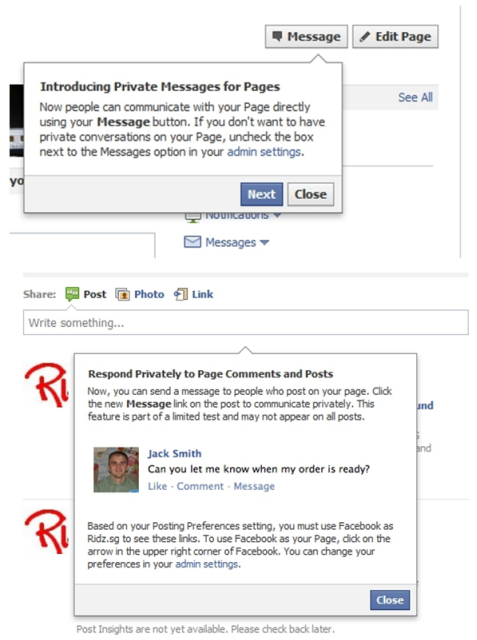
Facebook has begun introducing a new feature which allows business pages to receive private messages from their fans on the social network.
The new communications option, which has appeared for Asia-based admins only so far — although this could be down to time difference — is a significant introduction that will allow businesses to interact more closely with customers on the service than ever before.
Consumer facing businesses will find the feature particularly useful as it enables more personal communication with individual customers, opening the possible of a greater level of customer service on Facebook. The move is also likely to cut down on the pain of off-topic comments on company pages and reduce communication lost when Facebook fans fail to take their comments to customer service channels outside of the social network.
Facebook's more than 800 million members will now be able to convert their profiles to the new Timeline design.
The world's largest social network announced Timeline in September 2011, and now it's available worldwide. The feature replaces current user profiles and dramatically overhauls how information is shared on the service.
"It's a way to tell all the important stories from your life on a single page," Facebook co-founder and CEO Mark Zuckerberg said when he announced the new feature at his company's F8 Conference.
Timeline shows all the updates a person has added to Facebook since they joined the site. It also follows the social network's desire to provide users with a single place to showcase what has happened in their lives over the years.
Aside from a prominent picture at the top and basic information below it, Timeline has a right sidebar listing years in chronological order that you can click on to see what a user shared on the site, who they made friends with, and other information for any given period. Timeline even includes a map where people can input where they've been around the world.
Facebook said this morning that people can head over to its Timeline information page and turn the feature on. Upon doing so, they will have seven days to review their timelines and decide whether certain photos or wall posts shared on the site over the years should be shared or kept hidden from view.
I loaded up Timeline this morning and was immediately hit with a sense of nostalgia. I went back to updates and posts friends put on my wall years prior. In many cases, they were things (and events) that I had long forgotten. But Facebook hadn't. And now, my friends and I can relive some of those moments.
Timeline has privacy features.
(Credit: Facebook)
Aside from that, I was pleased with Facebook's decision to let me customize just about everything in Timeline. If there was something I didn't think should be shared any longer, I simply made it private. And if certain information was worth sharing again, I made it publicly viewable.
Inevitably, some folks will complain about Timeline's design and Facebook heaping major changes on its user base. But from what I've seen so far, it's a solid update. It offers privacy features, it comes with a nice design, and it makes getting to know people (in the virtual world, at least) a bit easier.
Facebook said it will automatically push the timeline live seven days after someone signs up for the new feature. However, if folks are content with what's shared after reviewing it, they can push it live themselves at any point within that period.
To enable Timeline, go to this page and click on “Get Timeline.”
A faster, simpler way to stay close to everything you care about.
The changes were released Thursday in updates to Twitter's software for smartphones and tablet computers. Visitors to Twitter's website should start seeing the new look during the next few weeks.
With the changes, it will be easier to find people and companies with Twitter profiles. All it will take is typing an "@" symbol in front of a user's handle.
Entering a subject with a hash tag "#" in front of it will show everything on Twitter related to that topic. And clicking on a specific tweet will display any other exchanges tied to the message to provide further context about the discussion.
Profile pages are also being expanded so individuals and companies can showcase more information about themselves in text, photos and video.
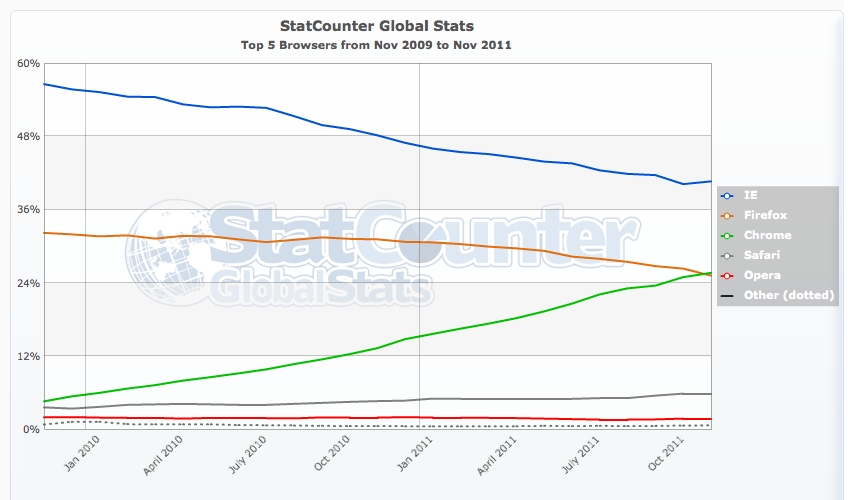
If one in 50 people on the Web move from Firefox to Chrome, Google's browser will unseat Mozilla's for the No. 2 spot in worldwide usage.
That's because, according to Net Applications' November browser usage measurements, Chrome is now within 4 percentage points of Firefox. With a 2 percentage-point increase in one and a 2 percentage-point decrease in the other, Google comes out on top.
Firefox dropped 0.4 percentage point to 22.1 percent of usage in November, while Chrome gained 0.7 percent to 18.2 percent. If that rate was to continue, Chrome would outpace Firefox in March 2012, but fluctuations make such predictions difficult.
Firefox once was the prime challenger to Microsoft's Internet Explorer, which for years languished in the doldrums of software development. Now it shares that role with Chrome and, to a lesser degree, Apple's Safari. Microsoft is in high gear again, though, with IE9 a credible challenger and IE10 shaping up to be a strong competitor when it's finished in 2012.
The browser market is now fiercely competitive as browser makers use the software to drive their agendas. For Microsoft, it's about the Metro user interface in Windows 8; for Google, it's browsing speed and Web applications; for Mozilla, it's a Web built on openness and standards; and for Apple, the best mobile devices.
In the mobile market, Apple's Safari dominates, while Opera Mini and the Android browser jockey for second place.
In November, IE's steady decline stopped, with Microsoft's browser holding steady at 56.2 percent of usage. Microsoft has largely written off Windows XP users by requiring Windows Vista or Windows 7 for its current IE9. The company measures its performance by Windows 7 usage. there, IE9 passed Chrome and Firefox in usage and now trails only IE8.
The vast majority of browser usage today is from personal computers--92.2 percent. But with smartphones and tablets, mobile-device usage is generally increasing. In November, it reached a record 6.7 percent, according to Net Applications.
The top mobile browser by far is Apple's Safari, but it plunged 7 percentage points to 55.0 percent of usage in November. The Android browser had bumped Opera Mini aside in October for the second-place spot, but in November, Opera Mini clawed its way back. Opera's lightweight browser, which runs on thousands of phones, surged 7 percentage points to 20.1 percent, while the Android browser dropped 2.2 percentage points to 16.4 percent.
Opera also offers a full-fledged browser, Opera Mobile, for higher-end smartphones. But that remains relatively rare at 0.4 percent of mobile browser usage.
If you forget birthdays until Facebook reminds you, or you constantly fear that your friends pay for lunch more often than you, then PayPal's new Facebook app is for you. Send Money is aptly named, and while you can choose to bundle your e-payment with a silly customized greeting card, there's no need for it. Here's how to settle your accounts:
Click "Send a card with money" if you want to make a card. Click "or just send money" if you want to get down to business right away.
Step 2: Send a card or just send money.
Give PayPal permission to see your friends list and make posts in your name.
Type in your friend's name, then e-mail address (needed for fraud protection and account confirmation).
Write a message to your friend; if you haven't told him what you're doing, an explanation would probably be most welcome. You can attach photos or YouTube clips, if you'd like.
Step 5: Create message.
Add money. If you use your bank info or PayPal account, there's no fee. If you use a credit card, there is a fee that currently stands at 2.9 percent plus 30 cents in the U.S.
You'll need to sign in to your PayPal account to confirm and choose a payment method. You can also tell Send Money to skip this step in the future when using the same computer, but you may want to keep another layer of security active.
Your friend will see a notification in Facebook and in his e-mail. Once he logs in to PayPal, he should soon see a bump in his account balance.
That's all there is to it. From now on, forgetting your wallet is no excuse.
Microsoft SkyDrive users will find some much-needed enhancements the next time they log onto the cloud-based storage site.
As part of an ongoing effort to improve SkyDrive, Microsoft yesterday revealed a series of tweaks designed to make the site more efficient and user-friendly. Described in a blog posted yesterday and seen in the video below, the changes focus mostly on sharing and file management.
Admitting that sharing folders and files on SkyDrive has been difficult and unreliable in the past, Microsoft has simplified the ability to share. Instead of setting up specific folders for sharing, you can now share individual files. Right-clicking on a file opens a popup menu where you can select the Share command. You can also share a file from a menu that appears when you open that file in your browser.
For example, clicking on a Word document opens it in your browser via Microsoft's Word Web App. From there, a Share command appears as one of the menu options. This process also works for images, PDFs, and a variety of other file types.
Sharing a file lets you send its link to other people. But SkyDrive also now lets you share or upload files to Facebook and LinkedIn where you can reach a variety of friends and contacts in one shot.
By default, all your SkyDrive files are private unless you specifically elect to share them.
Managing your SkyDrive files is also now much easier. You can name a new or existing folder inline, meaning that a text box appears for you to enter the name, just like in Windows Explorer. And by displaying your content in a Details view, you can select multiple files and then move, delete, or download them all together.
Best of all, you can now right-click on any file and choose from a variety of commands, such as Open, Download, Move, Copy, and Delete. If you right-click on a Microsoft Office document, you can also opt to open the file in either its Office Web App version or in its local version. For example, you can view an Excel spreadsheet either in the browser through the Excel Web App or in your local copy of Excel.
Microsoft has kicked in several other enhancements, including support for more file types and a cleaner slideshow view for your photos.
The changes in SkyDrive are helpful and much needed, and I applaud Microsoft for its efforts. But one major improvement I'm still waiting for is better support for synced folders and files. One of the ways I use SkyDrive is to synchronize certain documents and files from my PCs to the cloud. Through Windows Live Mesh, specific folders and files are automatically backed up to SkyDrive on a regular basis.
But for some reason, Microsoft treats synced files differently than files you upload directly into SkyDrive. You can't manage your synced files online. Clicking on a synced file gives you only two options--either download it or open it through its associated application. And none of the enhancements rolled out yesterday affect synced folders or files.
Even moving back and forth between your uploaded files and your synced files is extremely clumsy. I know Microsoft has other tricks up its sleeve for SkyDrive. I just hope that a more user-friendly approach to synced folders is one of them.
Six months ago we started rolling out a new look and feel for Search, News, Maps, Translate, Gmail and a bunch of other products. Our goal was to create a beautifully simple and intuitive user experience across Google.
We’re now ready for the next stage of our redesign—a new Google bar that will enable you to navigate quickly between our services, as well as share the right stuff with the right people easily on Google+.
Instead of the horizontal black bar at the top of the page, you’ll now find links to your services in a new drop-down Google menu nested under the Google logo. We’ll show you a list of links and you can access additional services by hovering over the “More” link at the bottom of the list. Click on what you want, and you’re off.
To find out more about the new Google bar, take a look at this video or read google Help Center article.
Making navigation and sharing super simple for people is a key part of our efforts to transform the overall Google experience, which is why we’re very excited about this redesign. Enjoy!